As you can see I'm still working on sites, lists and views and I ran into another challenge.
It started out very basic. I wanted to create a discussion forum list on a site.
// Create new list
listGuid = newWeb.Lists.Add("Forum", "ForumDescription", "Forum", "00BFEA71-6A49-43FA-B535-D15C05500108", 108, "", SPListTemplate.QuickLaunchOptions.Off);
SPList forumList = newWeb.Lists[listGuid];
After succesfully creating the forum list I wanted to add a custom view to the list. That seemed to be easy enough as well.
// Add an extra view to the list
viewFields = new StringCollection();
viewFields.Add("LinkDiscussionTitle");
viewFields.Add("Author");
viewFields.Add("DiscussionLastUpdated");
newView = forumList.Views.Add("Portal View", viewFields, "", 100, true, false);
newView.Update();
Unfortunately creating a view using the code above causes the link on the title takes you to the forum list, instead of taking to the item for which you clicked the title. After doing some investigating via the user interface I found out that the subtle difference can be found in the View settings, under Folders. This setting is specific for the discussion forum. By default the choices "Show items inside folders" and "In all folders" is selected. When you change the second setting (Show this view:) to "In the top-level folder" the link on the title item behaves the way you expect and want it to behave.
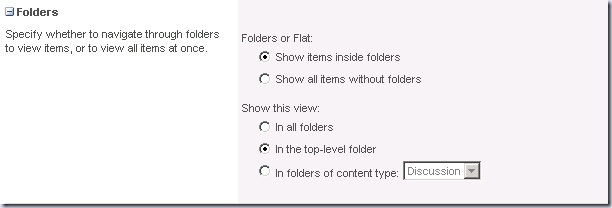
Now the next challenge was to find out how to change the Folders settings using the object model. There is no property on the SPList or SPView object to change these settings, but after comparing the xml exports of the list with both settings I found out that there is a ContentTypeId property on the SPView object and that this was the only thing that changed between the two exports.
The way to set the "Show this view" setting to "In the top-level folder" is by using this code. Notice the second to last line, that's the line that I added to achieve this.
// Add an extra view to the list
viewFields = new StringCollection();
viewFields.Add("LinkDiscussionTitle");
viewFields.Add("Author");
viewFields.Add("DiscussionLastUpdated");
newView = forumList.Views.Add("Portal View", viewFields, "", 100, true, false);
newView.ContentTypeId = new SPContentTypeId("0x012001");
newView.Update()
So in the end the code you need to get the right settings for you discussion forum view is not difficult at all, the difficult part was finding out what code to use.